A festive video call shows a different view of your outfit from an in-person gathering. Choose a frame that includes some of the saree, use gentle light and test the colours on the device you will actually use.
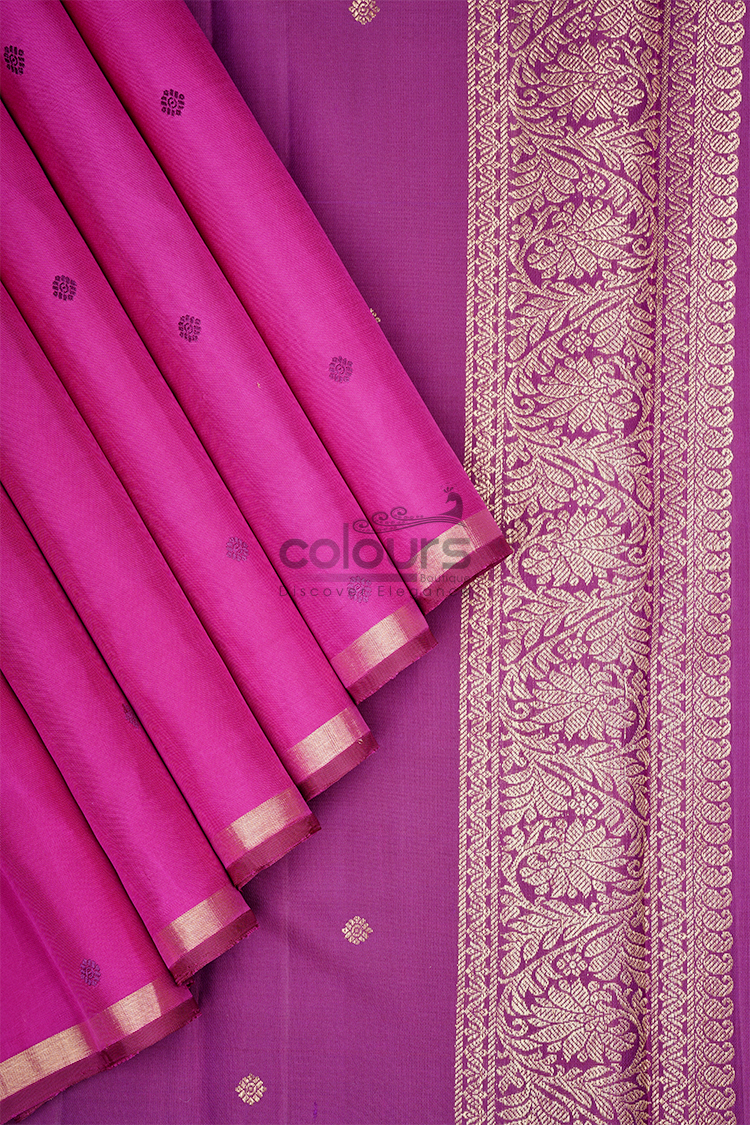
The CB001 – 6002-BL Colours Arani Kanchipuram Silk Saree offers a fuchsia-pink body, delicate self-woven butta and a refined antique-gold zari border. Its strong colour can form the centre of a cheerful Deepavali call, while the smaller woven details deserve a little attention during setup.
Decide how much of the outfit you want to show
A close head-and-shoulders view may display mainly your blouse. If you want relatives to see the saree, move the camera far enough back to include the shoulder drape and part of the body.
Do not make the frame so wide that conversation feels distant. A comfortable seated view with a visible section of the pallu or border is often enough.
Set the device on a stable surface rather than balancing it on fabric or holding it throughout the call. This lets you greet people naturally and keeps the picture more consistent.
If you want to share a full-length view, do so briefly from a safe, uncluttered position. There is no need to remain standing to prove that you dressed for the occasion.
Let the fuchsia colour lead
The saree’s fuchsia body already supplies a clear colour statement. Begin with a simple background so that your outfit and face remain easy to see.
A background containing several equally bright pink objects can make the saree less distinct. Conversely, a completely blank setting is not required. A tidy corner with a few familiar festive details can feel warm without competing with the clothing.
Use decorations you genuinely have. Keep lamps and candles away from loose fabric and the device. A digital backdrop can also be used, although its edges may interact with the outline of your hair and drape.
Test the actual view rather than assuming a particular wall colour will work.
Place the light before adjusting the outfit
Face a comfortable light source instead of sitting with a bright window directly behind you. Then check whether the fuchsia appears too intense or the gold border loses detail.
The camera, display and call application can all affect the image. You are aiming for a clear, pleasant view, not a guaranteed colour reproduction.
Try moving the light or the seat slightly before changing the outfit. A small change in angle can be more effective than adding brighter lighting.
Do not point a hot light close to the saree. Ordinary room light or indirect daylight may be sufficient, depending on your setting.
Give the self-woven butta a chance to appear
Tonal woven details can be less visible on a compressed video image than they are in person. The self-woven butta may read as texture rather than individual motifs.
That is not a reason to exaggerate contrast with a filter. Keep the colour natural and enjoy the saree’s overall effect.
If someone asks about the pattern, you can briefly show a closer section without repeatedly pulling the drape apart. Alternatively, share the product page separately so they can inspect the original photographs.
Arrange the border so that some of it falls within the frame. You do not need to display every feature at once.
Choose jewellery for conversation
Consider what will be visible near your face and what may interfere with a headset or microphone. Earrings that repeatedly touch a headset can be distracting, even if they look attractive in a photograph.
A quieter necklace or a single pair of earrings may be enough beside the pink body and gold border. Compare the pieces on camera before the call rather than assuming that more decoration will read better.
Choose a blouse you can sit in comfortably. Confirm what the saree purchase includes; the video-call styling does not imply a matching blouse is supplied.
If you will also attend an in-person event, select accessories that suit both settings where possible. You can adjust the camera frame without rebuilding the outfit.
Make a cross-border celebration easy
For family joining from India and Singapore, write the invitation time with the relevant time zones so everyone knows when to connect. Check the call details separately from the outfit preparation.
Keep the device charged and place drinks away from the saree and electronics. Sit where you can hear comfortably without continually leaning towards the microphone.
The celebration is about conversation. Once the picture is clear, avoid spending the whole call monitoring your own image.
For broader festive outfit choices, explore the saree colour guide and the Colours Boutique collection. This fuchsia design is one option for people who enjoy a bright colour in a relaxed online gathering.
Frequently asked questions
Will the saree look exactly the same on every screen?
No. Cameras, lighting, connection quality and displays can change its appearance.
Should I add a beauty or colour filter?
A filter is not necessary to show the outfit. A clear, naturally lit view is a better starting point for representing the colour.
Must the whole saree be visible throughout the call?
No. A comfortable conversational frame with some of the drape visible is enough.
Are the butta metallic gold?
The product describes self-woven butta and an antique-gold zari border. Do not treat those as the same feature.
Bring colour to the conversation
Explore the fuchsia CB001 – 6002-BL saree and plan a simple camera setup that lets you enjoy both the outfit and the family celebration.